
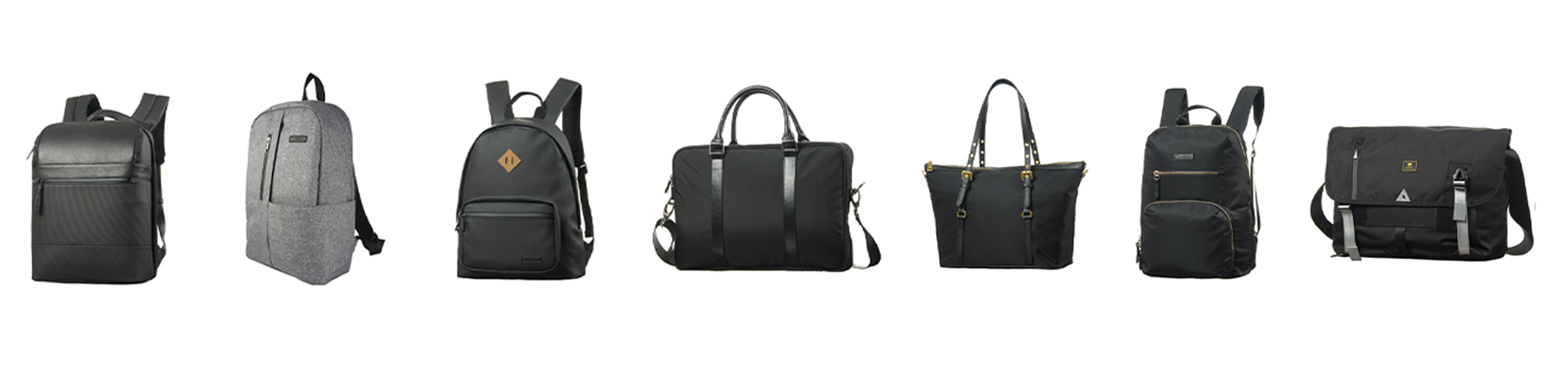
В современную эпоху, когда мобильная работа стала нормой, рюкзак для ноутбука Рюкзак для ноутбука перестал быть просто «контейнером» и превратился в мобильную рабочую станцию для профессионалов. Выбор или индивидуальная настройка качественного и подходящего рюкзака для ноутбука требует учета множества факторов. Эта статья представляет собой исчерпывающее руководство для менеджеров по закупкам, розничных продавцов и покупателей брендов, помогающее им принимать обоснованные решения.
Оглавление
• Обзор необходимых функций для лучших рюкзаков для ноутбуков
• Долговечность и защита
• Комфорт
• Хранение и организация
• Водостойкость
• Безопасность
• Часто задаваемые вопросы при выборе рюкзака для ноутбука
Высококачественный рюкзак для ноутбука должен обладать пятью основными характеристиками: прочность, комфорт, вместительность, водостойкость и безопасность. В совокупности эти характеристики являются ключевыми критериями для профессиональных пользователей при выборе рюкзака — каждая из них незаменима. Прочность гарантирует, что рюкзак выдержит частые деловые поездки и ежедневные нагрузки, а комфорт напрямую влияет на длительное использование при переноске.
• Высококачественные материалы: При выборе рюкзака для ноутбука отдавайте предпочтение прочным материалам, таким как нейлон или полиэстер. Эти материалы известны своей износостойкостью и хорошо подходят для повседневного использования. Кроме того, проверьте наличие усиленных швов и прочных молний, поскольку эти детали существенно влияют на общую долговечность рюкзака.
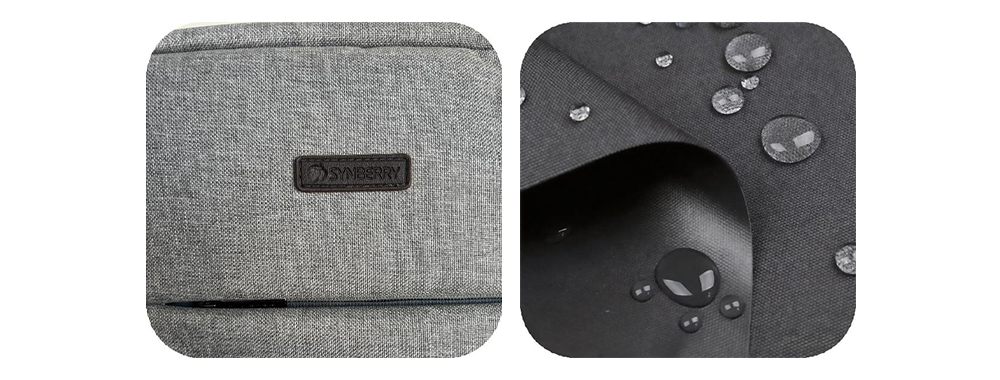
Водонепроницаемая ткань Оксфорд 900D
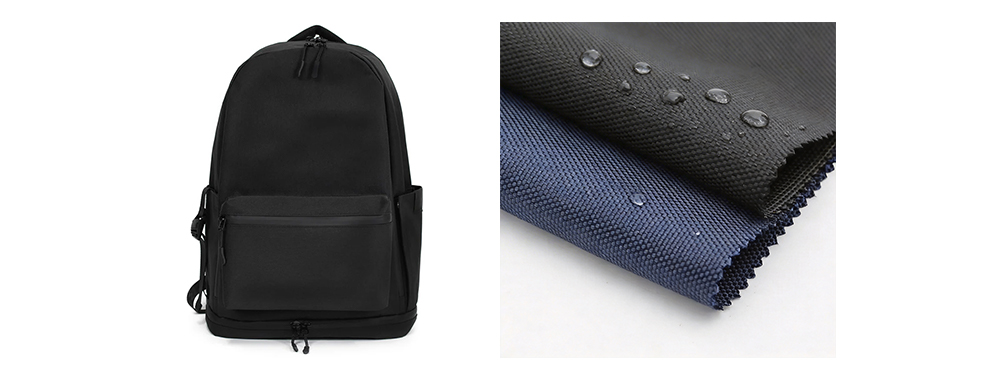
Высокоплотный водонепроницаемый нейлон 900D
• Мягкое отделение для ноутбука: Убедитесь, что отделение для ноутбука в вашем рюкзаке имеет толстую подкладку, обеспечивающую максимальную защиту вашего устройства. Подкладка должна быть достаточно плотной, чтобы поглощать удары и предотвращать повреждения от случайных толчков или падений. Некоторые рюкзаки также имеют дополнительную подкладку в нижней части отделения для большей устойчивости.
Возьмем в качестве примера SYNBERRY / SY-LB18047
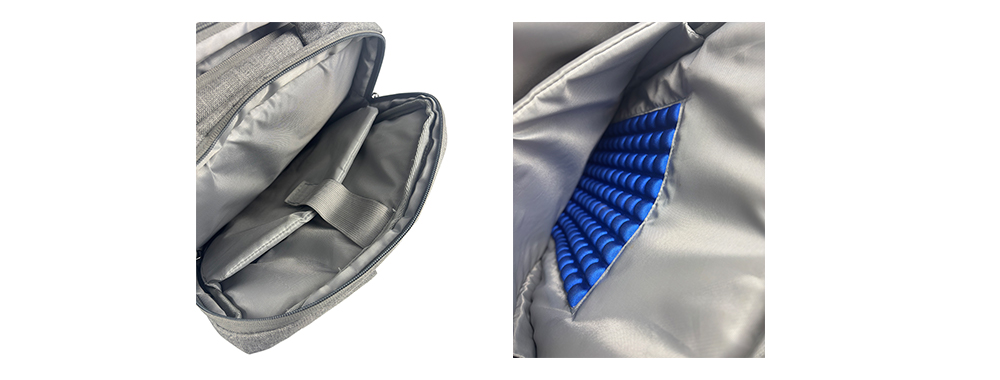
Отделение для ноутбука с мягкой обивкой толщиной 5 мм. Противоударная подушка с другой стороны
Боковая сторона отсека
• Усиленное дно: Для повышения прочности и защиты ноутбука от ударов рекомендуется выбирать рюкзак с усиленным дном. Усиленное дно обеспечивает дополнительную поддержку, предотвращая провисание рюкзака при размещении на земле или других поверхностях. Эта особенность помогает сохранить форму рюкзака и продлевает срок его службы.
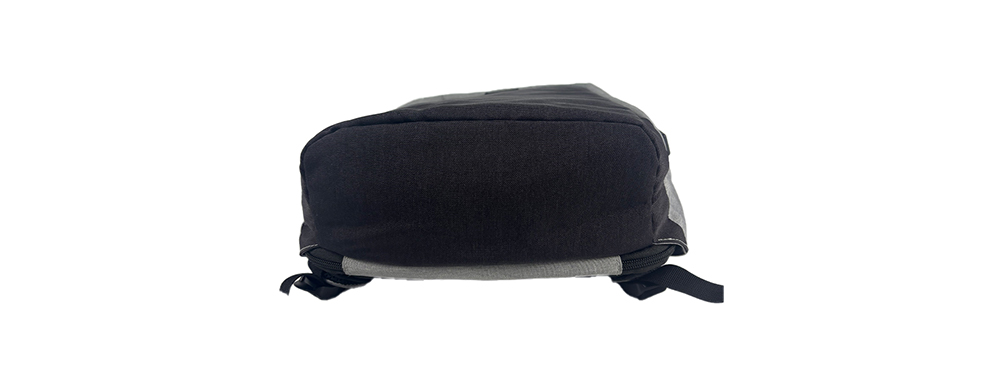
Мягкое и усиленное дно
• Усиленная ручка: Усиленная ручка помогает равномерно распределить вес ноутбука и других вещей, предотвращая поломку или разрыв ручки и продлевая срок службы рюкзака. Она также снижает нагрузку и усталость на руки.
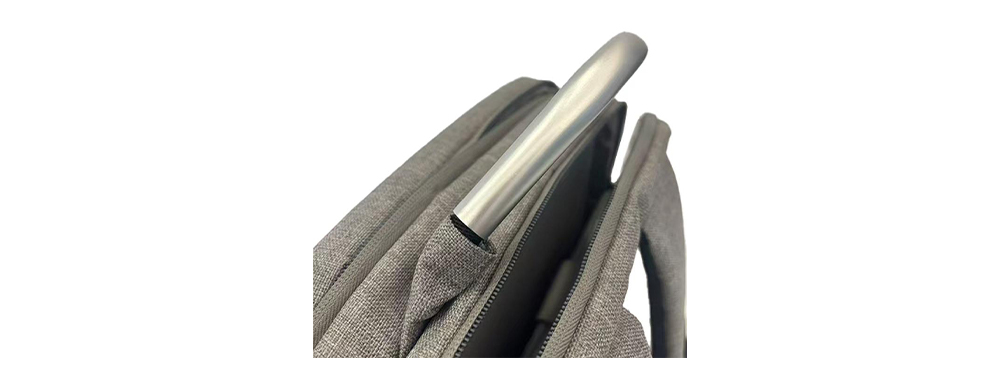
Металл Ручка
• Мягкие плечевые лямки и спинка: Рюкзак для ноутбука с толстыми плечевыми лямками и мягкой спинкой значительно повышает комфорт. Дополнительная набивка помогает равномерно распределить вес, снижая нагрузку на плечи и спину. Выберите модель с регулируемыми лямками, чтобы найти наиболее удобное для вас положение при ношении.
• Дышащие материалы: Выбирайте спинку из дышащих материалов, таких как сетка или вентилируемая пена, которые эффективно способствуют циркуляции воздуха и уменьшают потоотделение и накопление тепла на спине. Особенно летом или при длительном использовании хорошая воздухопроницаемость значительно повышает комфорт и предотвращает дискомфорт, вызванный скоплением пота.
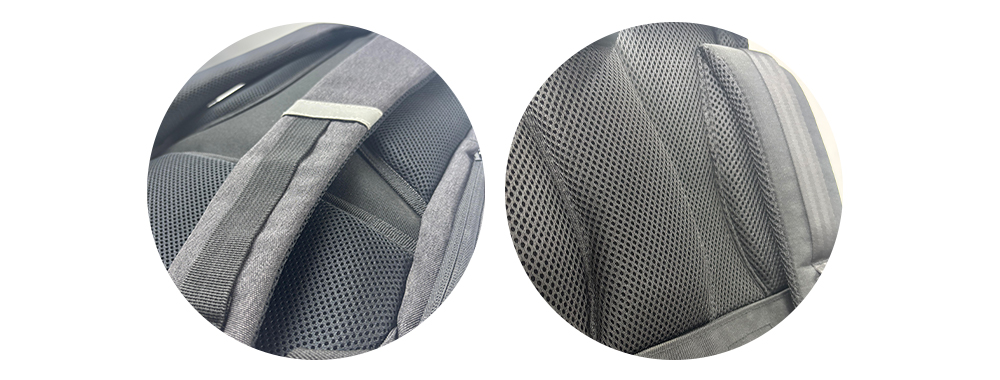
Толстые плечевые лямки и спинка Дышащая сетчатая ткань
• Эргономичный дизайн: Эргономичный дизайн гарантирует, что рюкзак повторяет естественные изгибы вашего тела, помогая снизить напряжение и усталость. При выборе рюкзака обратите внимание на его контурную форму, чтобы он плотно прилегал к спине. Такая конструкция помогает поддерживать правильную осанку и повышает общий комфорт.
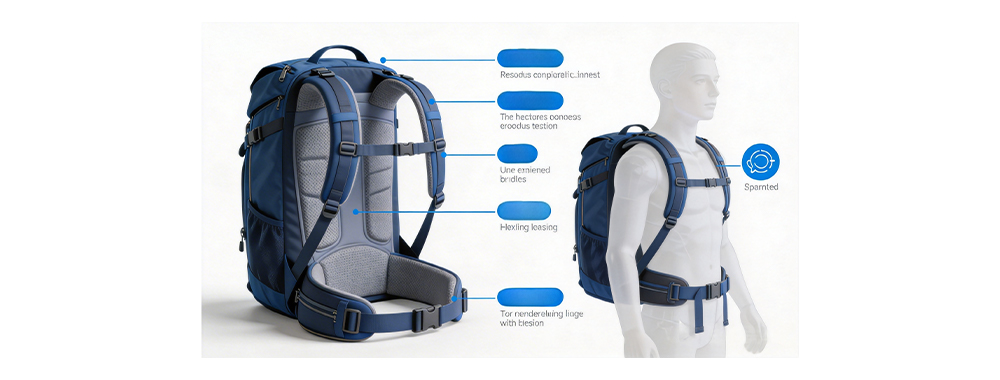
• Распределение веса и баланс: Хорошо продуманный рюкзак для ноутбука должен иметь сбалансированную систему распределения веса. Это означает, что более тяжелые предметы, такие как ноутбук, располагаются ближе к спине, чтобы избежать излишней нагрузки. Кроме того, симметричные боковые карманы важны, чтобы избежать наклона рюкзака из-за неравномерного распределения веса.
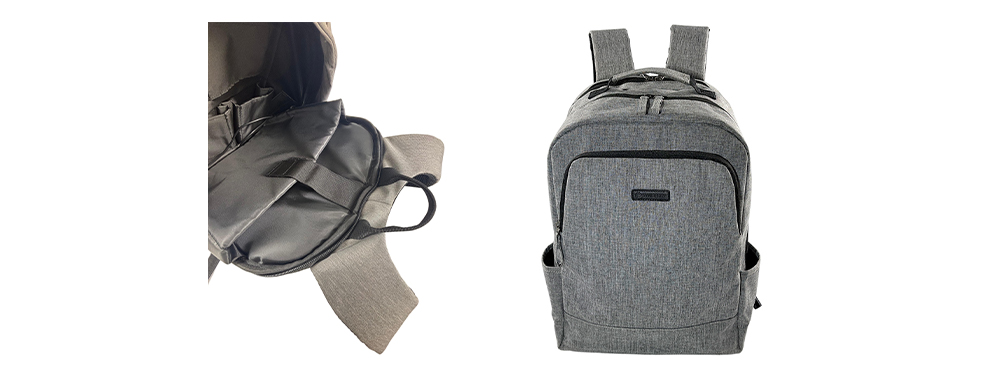
Возьмем в качестве примера SYNBERRY / SY-LB18047
Основа организованного хранения — рациональное планирование пространства и легкий доступ. Качественный рюкзак для ноутбука должен функционировать как прецизионный ящик для инструментов, предоставляя для каждого предмета отдельное место и обеспечивая легкий доступ к часто используемым вещам. Ключевые особенности хранения должны включать следующее:

SYNBERRY / SY-LB18047 Полная комплектация
• Многофункциональные отсеки: Наличие нескольких отделений — основа организованного хранения. При выборе рюкзака обращайте внимание на модели с отдельными секциями для хранения ноутбука, планшета, телефона, повербанка, книг и других аксессуаров. Это гарантирует, что у каждого предмета будет свое место, что позволит быстро найти то, что вам нужно.
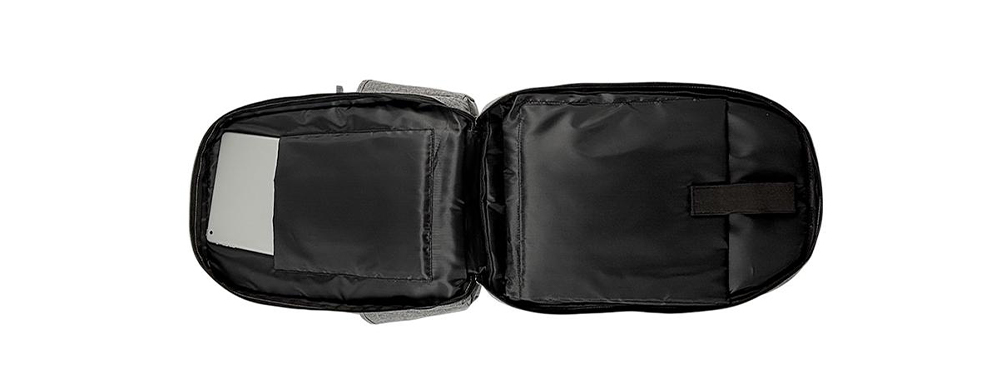
• Главное отделение: Рюкзак должен быть оснащен специальным отделением для ноутбука с толстой подкладкой, чтобы предотвратить трение устройства о другие предметы. Для дополнительной устойчивости можно рассмотреть отделение для ноутбука с ремнями или отдельный защитный чехол. Для часто путешествующих за границу людей специальное отделение для ноутбука, соответствующее требованиям TSA и позволяющее ему раскладываться на 180°, значительно повышает эффективность прохождения контроля безопасности в аэропорту. Ключевой особенностью является подвесная конструкция отделения для ноутбука (не касающегося дна), которая обеспечивает амортизацию в случае падения рюкзака.
• Отделение для документов: Рекомендуется конструкция с полным раскрытием на 180°, а также наличие нескольких карманов формата А4, что позволит быстро получить доступ к контрактам, отчетам и другим важным документам.
• Область передней панели: Передняя панель может быть оснащена многослойными карманами. Внешние карманы идеально подходят для предметов, к которым нужен быстрый доступ, таких как визитки или ручки, а внутренние карманы могут вместить аксессуары, например, внешние аккумуляторы и зарядные кабели. Прозрачные сетчатые карманы или эластичные лямки позволяют визуально и организованно сортировать вещи. Такая тщательная организация хранения аксессуаров часто отражает профессиональный уровень. Для деловых путешественников рюкзак также должен иметь расширяемые боковые карманы для бутылок с водой и отделения для складных зонтов, а также водонепроницаемое дно для предотвращения протечек.
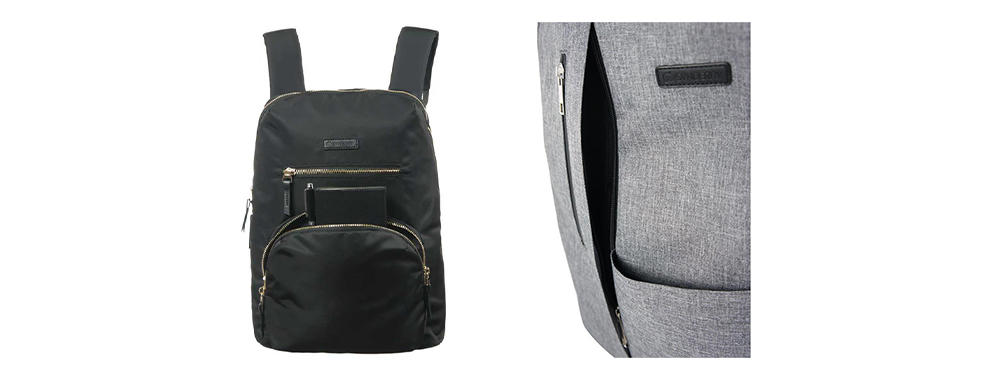
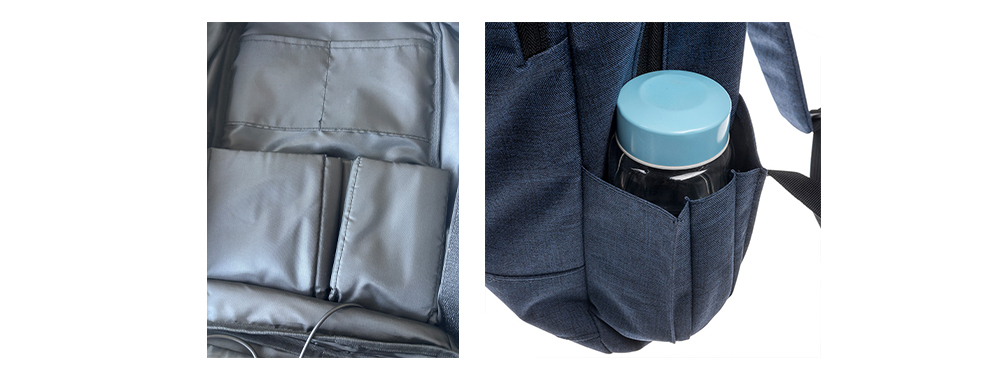
Организованные внутренние отсеки Расширяемый карман для бутылки с водой
• Усовершенствованный дизайн: Не следует пренебрегать правильной организацией кабелей. Рюкзак оснащен внешним USB-портом для зарядки сбоку, а также специальным внутренним карманом для внешнего аккумулятора, что позволяет пользователям заряжать свои устройства в любое время, не роясь в рюкзаке.
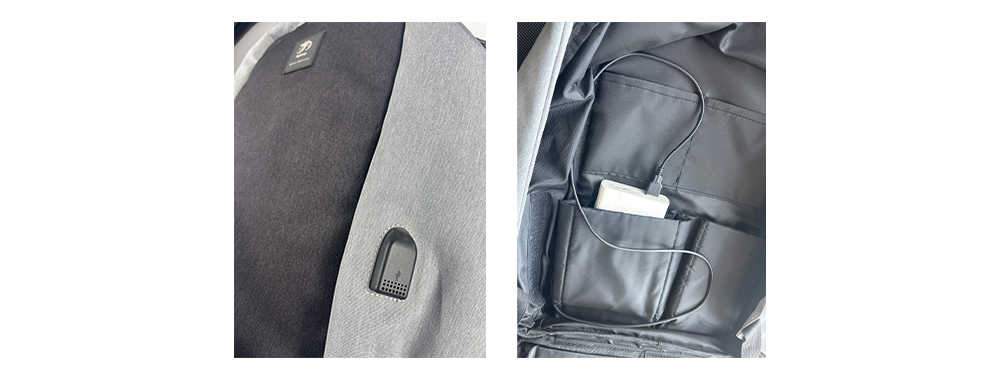
Пример NBERRY / SSY-LB17108: Встроенный USB-порт
• Рекомендуемая вместимость: Для переноски только ноутбука выбирайте рюкзак объемом 8–15 литров, подходящий для ноутбуков с диагональю 13–15 дюймов. Для ежедневных поездок рекомендуется рюкзак объемом 15–25 литров, в который поместятся ноутбуки с диагональю 15–15,6 дюймов и необходимые вещи. Для коротких поездок идеально подойдет рюкзак объемом 28–32 литра, обеспечивающий дополнительное место для одежды на 1–2 дня и косметички.
Водонепроницаемость — важнейшая характеристика рюкзаков для ноутбуков, напрямую связанная с безопасностью электронных устройств. Во время поездок на работу могут произойти внезапные дожди, случайные пролития кофе или брызги с мокрых поверхностей. Эффективная водонепроницаемая конструкция может предотвратить повреждение ценных устройств, что делает её важной защитной функцией для профессиональных рюкзаков. Ниже представлены решения различных размеров:
• Гидроизоляционная обработка на уровне материала: В высококачественных рюкзаках для ноутбуков обычно используются два типа водонепроницаемых решений. Первый — это использование тканей, которые по своей природе водонепроницаемы, таких как нейлон или полиэстер, обработанные покрытием из ТПУ. Эти материалы обладают высокой плотностью волокон, что затрудняет проникновение капель воды. Второй подход заключается в нанесении водонепроницаемого покрытия на обычные ткани, обычно это полиуретановое или ПВХ-покрытие. Среди них полиуретановые покрытия являются одновременно экологически чистыми и гибкими, что делает их особенно подходящими для деловых рюкзаков.
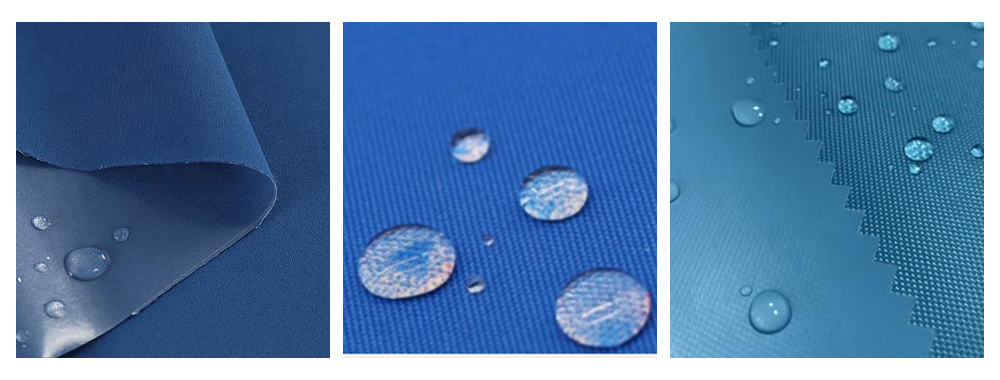
Водонепроницаемая ткань из ТПУ Водонепроницаемая ткань из полиуретана ПВХ водонепроницаемая ткань
• Степень водонепроницаемости: При выборе рюкзака следует обращать внимание на степень водонепроницаемости ткани. Рейтинг IPX4 означает защиту от брызг, IPX5 — от струй воды под низким давлением, а профессиональный рейтинг IPX6 для использования на открытом воздухе — от сильных струй воды.
• Детали гидроизоляции конструкции: Помимо самих материалов, водонепроницаемость рюкзака во многом зависит от точной конструкции. Наиболее уязвимым местом с точки зрения водонепроницаемости является система молний. Высококачественные рюкзаки часто оснащены водонепроницаемыми герметичными молниями или чехлами от дождя, обеспечивающими полную герметизацию при закрытии молнии. Швы следует герметизировать водонепроницаемой лентой, чтобы предотвратить образование отверстий от иглы, через которые может просачиваться вода. Для дна, которое часто соприкасается с землей, рекомендуется использовать материалы с улучшенными водонепроницаемыми свойствами, такие как прорезиненное дно, водонепроницаемый баллистический нейлон или двухслойная усиленная ткань оксфорд. Некоторые модели высокого класса также имеют конструкцию с закручивающимся верхом, использующую физические методы складывания для предотвращения проникновения дождевой воды.

• Функциональные водонепроницаемые отделения: Для экстремальных погодных условий или преодоления водных преград некоторые профессиональные рюкзаки оснащены дополнительным независимым водонепроницаемым карманом или отделением для разделения влажных и сухих вещей внутри основного отделения. В качестве основной защищенной зоны в некоторых моделях отделение для ноутбука имеет полностью закрытую водонепроницаемую внутреннюю конструкцию, гарантирующую, что даже если внешний слой рюкзака полностью промокнет, устройство внутри останется сухим. Для пользователей, которые часто путешествуют по дождливым районам, съемный дождевой чехол является практичным дополнительным преимуществом. Обычно он хранится в скрытом кармане сверху или снизу рюкзака и может быть быстро развернут, чтобы накрыть всю поверхность во время дождя, обеспечивая защиту на 360 градусов.

• Проверка и обслуживание водонепроницаемости: На этапе оценки закупок можно провести простой тест для проверки водонепроницаемости: капните небольшое количество чистой воды на поверхность рюкзака и понаблюдайте, собирается ли вода в капли и скатывается ли с листа лотоса, а не быстро впитывается. При длительном использовании водонепроницаемое покрытие ткани постепенно изнашивается. Рекомендуется использовать специальный водоотталкивающий спрей для поддержания водоотталкивающих свойств каждые 6–12 месяцев, чтобы восстановить гидрофобные свойства поверхности. Важно понимать, что водостойкость и полная водонепроницаемость — это принципиально разные вещи. Первая подходит для кратковременного, легкого дождя, а вторая необходима для защиты от продолжительных сильных дождей. При закупке выбор продукции должен точно соответствовать сценариям использования целевого пользователя.
В деловых поездках и ежедневных поездках на работу безопасность рюкзака напрямую связана с защитой ценных электронных устройств и важных документов. Рюкзак для ноутбука, оснащенный комплексными функциями безопасности, может эффективно предотвратить риск кражи, утечки данных и случайной потери, обеспечивая профессионалам полное спокойствие. Вот некоторые ключевые функции безопасности, на которые следует обратить внимание:
• Противоугонная конструкция: Физическая защита — это основная мера безопасности. Стоит выбрать рюкзак с противоугонными функциями, например, со скрытыми карманами или отделениями. Эти скрытые места позволяют незаметно хранить ценные вещи. Некоторые модели высокого класса также оснащены кодовыми замками, одобренными TSA, или стальными тросовыми замками, позволяющими прикрепить рюкзак к неподвижным объектам, таким как сиденья или багажные полки, что особенно полезно в ситуациях, когда сумка временно остается без присмотра, например, в залах ожидания аэропортов или кафе. Также стоит обратить внимание на конструкцию застежек-молний; двусторонние молнии в сочетании с отверстием для замка позволяют пользователям прикрепить небольшой навесной замок, создавая двухуровневую защиту.
• Материалы, предотвращающие порезы: Выбор рюкзаков с усиленной прошивкой и износостойкой тканью может эффективно снизить риск кражи.

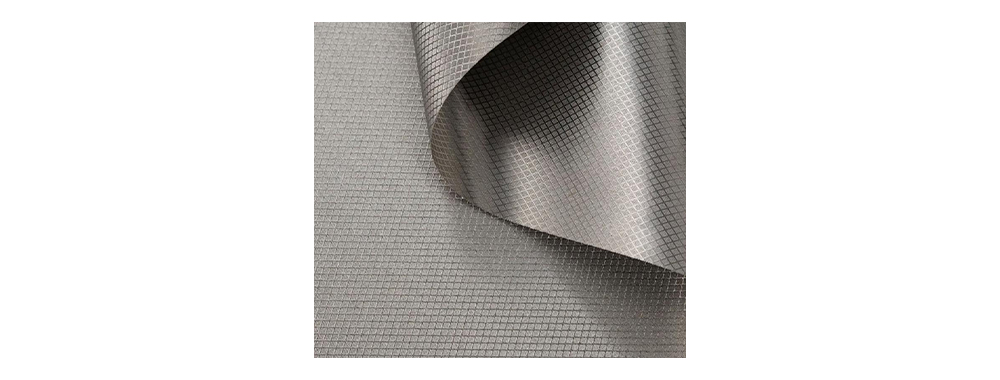
• Защита информации с помощью RFID: С развитием бесконтактных технологий защита личной информации от несанкционированного сканирования становится крайне важной. Выбирайте сумку/рюкзак для ноутбука с функцией защиты от RFID-сканирования, которая может блокировать передачу данных с кредитных карт или паспортов. Рекомендуется, чтобы внутренний слой отсеков для электронных устройств был отделан проводящей тканью. Это обеспечивает такие основные функции, как экранирование от электромагнитных помех (EMI), блокировка RFID-сигнала, предотвращение утечки сигнала электронного устройства (защита TEMPEST) и защита от электростатического разряда (ESD).
• Интеллектуальное отслеживание и позиционирование: Некоторые инновационные рюкзаки оснащены модулями отслеживания по Bluetooth или имеют специальные скрытые карманы для трекеров, таких как AirTags. В случае утери или кражи рюкзака пользователи могут отслеживать его местоположение в режиме реального времени через мобильное приложение. Продвинутые модели даже оборудованы системами GPS-позиционирования и функциями геозонирования, автоматически отправляя уведомление, когда рюкзак покидает заданную зону. Для корпоративных закупок поэтапное внедрение интеллектуальных рюкзаков с функцией отслеживания также может способствовать цифровой модернизации управления активами.
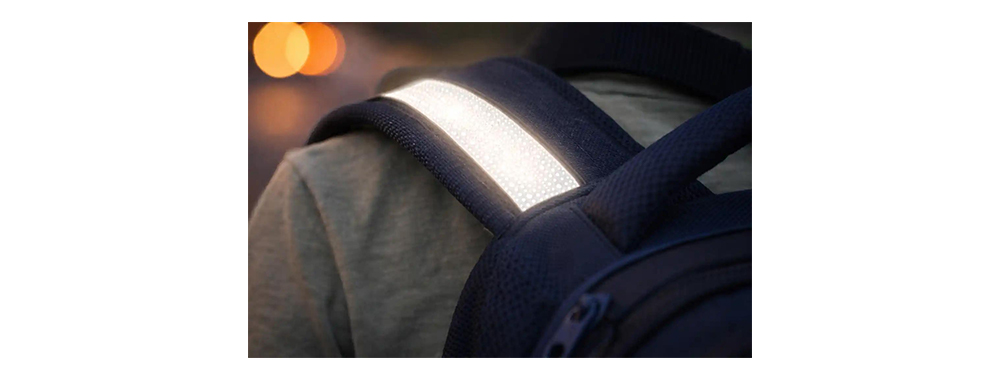
• Видимость в ночное время для обеспечения безопасности: Для тех, кто ездит на работу или на велосипеде в ночное время, светоотражающие полосы значительно повышают уровень пассивной безопасности. Некоторые деловые рюкзаки оснащены светоотражающими элементами высокой видимости на плечевых лямках, передней и боковых частях, создавая заметное предупреждение при освещении фарами автомобилей и тем самым снижая риск дорожно-транспортных происшествий. В некоторых моделях предусмотрена возможность снятия светоотражающих элементов, что позволяет сочетать профессиональный внешний вид днем с необходимыми функциями безопасности в ночное время.
• Комплексная оценка функций безопасности: В процессе закупок целесообразно создать многомерную систему оценки показателей безопасности. Эта система должна включать такие показатели, как прочность физической защиты, степень защиты от электронного излучения, практичность интеллектуальных функций и удобство использования. Важно отметить, что накопление функций безопасности часто приводит к увеличению как веса, так и стоимости. Поэтому конфигурации следует адаптировать с учетом основных сценариев риска целевой группы пользователей. Например, финансовые специалисты могут больше беспокоиться о защите от RFID-сканирования, в то время как пользователям, часто путешествующим за границу, необходимо отдавать приоритет сочетанию замков, одобренных TSA, и материалов, устойчивых к порезам. Точное соответствие функций безопасности сценариям использования позволяет достичь оптимального баланса между эффективностью защиты и удобством использования.
• В: Как определить, подходит ли рюкзак по размеру моему ноутбуку?
① Проверьте официальные размеры ноутбука (по диагонали в дюймах).
② Измерьте фактическую длину и ширину ноутбука (некоторые 14-дюймовые ноутбуки с узкими рамками могут быть меньше, чем традиционные 13-дюймовые).
③ Выберите отделение, размер которого на 0,5–1 дюйм больше размера ноутбука, для удобства доступа.
• В: Какие конкретные защитные элементы необходимы для отделения для ноутбука?
① Амортизирующие материалы: пенополиуретан EVA, пенополиуретан с эффектом памяти или воздушные подушки.
② Подвесная конструкция: дно отделения для ноутбука приподнято на 2-3 см над полом, чтобы защитить углы в случае падения.
③ Бархатная подкладка: предотвращает появление царапин на корпусе ноутбука.
• В: Как избежать болей в плечах и шее при длительном ношении рюкзака?
① Плечевые лямки: ширина должна быть ≥6 см, с дышащей сеткой и поролоновой подкладкой.
② Задняя панель: Дышащая сетчатая ткань с трехмерной канавкой для уменьшения накопления тепла.
③ Нагрудный ремень/поясной ремень: помогает распределить вес; необходим, когда нагрузка превышает 5 кг.
④ Регулировка центра тяжести: рюкзак должен плотно прилегать к спине, не наклоняясь назад.
• В: Какой оптимальный вес для рюкзака?
① Ежедневные поездки на работу: Рекомендуемый вес 0,8–1,2 кг
② Деловые поездки: Допустимый вес 1,2–1,8 кг (требуется более прочная опорная конструкция)
• В: Какие марки рюкзаков для ноутбуков рекомендуются?
Согласно обзорам рынка, ниже представлены некоторые из самых популярных брендов рюкзаков для ноутбуков:
① Рюкзак для ноутбука JanSport Authority Deluxe: отличается просторным внутренним отделением, мягким отделением для ноутбука, эргономичными плечевыми ремнями и множеством карманов для хранения.
② Дорожный рюкзак для ноутбука 2Matein: оснащен USB-портом для удобной зарядки в дороге; имеет мягкое специальное отделение для ноутбука; изготовлен из водостойких материалов.
③ Рюкзак The North Face Recon: известен своей прочной конструкцией, удобными мягкими плечевыми лямками и множеством карманов и отделений для хранения.
④ Рюкзак Patagonia Refugio: сочетает в себе функциональность и экологичность, изготовлен из плотной переработанной полиэстерной ткани, предлагает вместительное пространство для хранения и стильный дизайн.
⑤ Рюкзак для ноутбука Matein с USB-портом: имеет мягкое отделение для техники, множество карманов для удобной организации вещей и эргономичные плечевые лямки для более комфортного ношения.
| Автор | ||||||
|
Пожалуйста, читайте дальше, оставайтесь в курсе, подписывайтесь, и мы приглашаем вас рассказать нам, что вы думаете.




Авторское право
@2024 Synberry Bag & Package Products Co.,Ltd Все права защищены
.
 ПОДДЕРЖИВАЕМАЯ СЕТЬ